Skip to content
Spelling Boost

Spelling Boost

    • Spelling Boost
    • About
    • Best Spelling Apps For Kids
    • Blog
    • For Kids
    • For Parents
    • Global Reach
    • Guides
      • Best Spelling Apps
      • Best Spelling Apps For Adults
      • Create Custom Spelling Word Lists
      • Full Sentence Dictation Practice
      • How Busy Parents Can Save 2+ Hours on Weekly Spelling Homework
      • How to practice for a spelling test?
      • How to Scan Worksheet Spellings with Your Camera
      • How to Study for a Spelling Test
      • Master Hard Words with Tricky Words Mode
  • The Spelling Test Illusion

    The Friday–Monday Problem

    It’s a scene that plays out in kitchens and living rooms every week. Your child sits down on Thursday evening, runs through their spelling list a few times, and confidently walks into Friday’s test. The result? Full marks. You breathe a sigh of relief — another week done.

    Then Monday arrives. Your child writes a paragraph in class, and the teacher’s feedback comes back dotted with corrections. Words your child spelled perfectly just three days ago are now misspelled. Capital letters are missing. Full stops have vanished. It feels like all that practice was for nothing.

    If this sounds familiar, you’re not alone. This gap between test results and real writing is so common that there’s a name for it: the Spelling Test Illusion. It doesn’t mean your child isn’t trying hard enough. It means the way most spelling tests work doesn’t match how the brain actually uses spelling in everyday writing.


    Why Spelling Falls Apart During Real Writing

    To understand why this happens, think about what your child’s brain is doing during a traditional spelling test compared to actual writing.

    In a typical word-list test, the child hears one word, focuses entirely on that word, and writes it down. Their brain has one job: remember the correct sequence of letters. There’s no sentence to build, no punctuation to place, and no capital letters to think about. All of their mental energy goes toward a single task.

    Now compare that to writing a real sentence. Suddenly, the brain has to juggle many tasks at the same time:

    • Spelling — remembering the correct letters for every word in the sentence.
    • Capital letters — starting the sentence with a capital, capitalising names and places.
    • Punctuation — adding full stops, commas, question marks, and apostrophes in the right places.
    • Spacing — leaving clear gaps between each word.
    • Meaning — choosing the right word when words sound the same (like there, their, and they’re).

    When children are only trained on individual words, the sudden demand of handling all of these tasks at once overwhelms their working memory. Think of it like learning to pat your head and rub your tummy at the same time — each action is easy on its own, but doing both together takes practice. The spelling accuracy that looked rock-solid in isolation crumbles under this heavier workload.

    This is the heart of the Spelling Test Illusion. High scores on word-list tests give a misleading picture of a child’s true spelling ability, because the test conditions are far simpler than the conditions of real writing.


    The Missing Piece: Practising Spelling in Context

    The good news is that there’s a straightforward way to close this gap: practise spelling inside full sentences, not just as isolated words.

    When a child practises writing a complete sentence from dictation, their brain learns to manage spelling alongside everything else — capitals, punctuation, spacing, and word choice. Over time, the mental effort needed for each of these tasks decreases. Spelling becomes more automatic, and the child’s brain frees up energy to focus on what they actually want to say.

    Educators call this process building fluency. Just like a child learning to ride a bicycle eventually stops thinking about pedalling and starts enjoying the ride, sentence-level practice helps spelling become second nature.

    Contextual practice also solves one of the trickiest parts of English spelling: words that sound the same but are spelled differently depending on their meaning. A child practising the word there in isolation has no way to distinguish it from their or they’re. But when they hear and write the sentence “They’re going to play over there with their friends,” the meaning of each word becomes clear, and the correct spelling follows naturally. (Spelling Boost also helps during single-word practice — each word comes with AI-generated definitions and example sentences so your child can see exactly how a word is used in context, even before moving to full sentence dictation.)

    What Isolated Word Tests Miss

    Skill Tested by Word Lists? Tested by Sentence Dictation?
    Correct letter sequence ✅ Yes ✅ Yes
    Capital letters ❌ No ✅ Yes
    Full stops and commas ❌ No ✅ Yes
    Word spacing ❌ No ✅ Yes
    Choosing the right homophone ❌ No ✅ Yes — sentence meaning makes it clear
    Spelling under realistic conditions ❌ No — single-task focus ✅ Yes — multi-task, just like real writing

    This doesn’t mean word lists are useless — they’re a great starting point for learning new vocabulary. But to build the kind of spelling confidence that transfers into real schoolwork, children need to practise in the same way they’ll actually write: in full sentences.


    How Spelling Boost Makes Sentence Practice Effortless

    We built Text Practice Mode in Spelling Boost to solve exactly this problem. Instead of limiting practice to single words, your child can now practise complete passages — the same paragraphs their teacher sends home for homework — with the app handling all the dictation and marking for you.

    Step 1: Scan the Homework in Seconds

    No more typing out long passages by hand. Simply point your phone’s camera at the printed homework sheet and the app scans and converts it into a ready-to-use dictation exercise in seconds. The scanner supports both individual word lists and full text passages.

    Step 2: The App Dictates, Your Child Writes

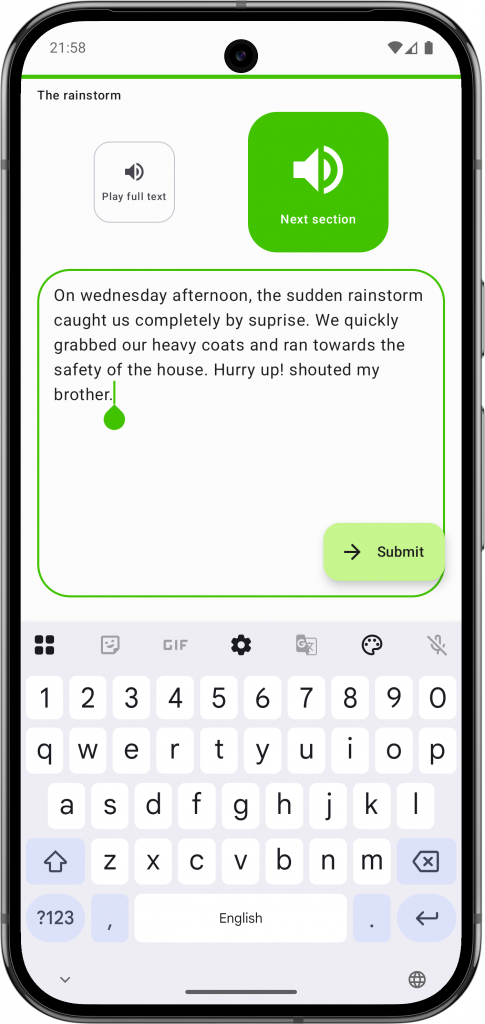
    Once scanned, Spelling Boost reads the passage aloud — sentence by sentence — using clear, natural-sounding speech in over 70 languages and regional accents. Your child listens and writes each sentence on the screen using their finger or a stylus. The app checks not just spelling, but also capitalisation, punctuation, and spacing — exactly the skills they need for real classroom writing.

    This means your child practises under realistic conditions every single time, building the kind of automatic fluency that isolated word drills simply cannot provide.

    Step 3: Friendly, Encouraging Feedback

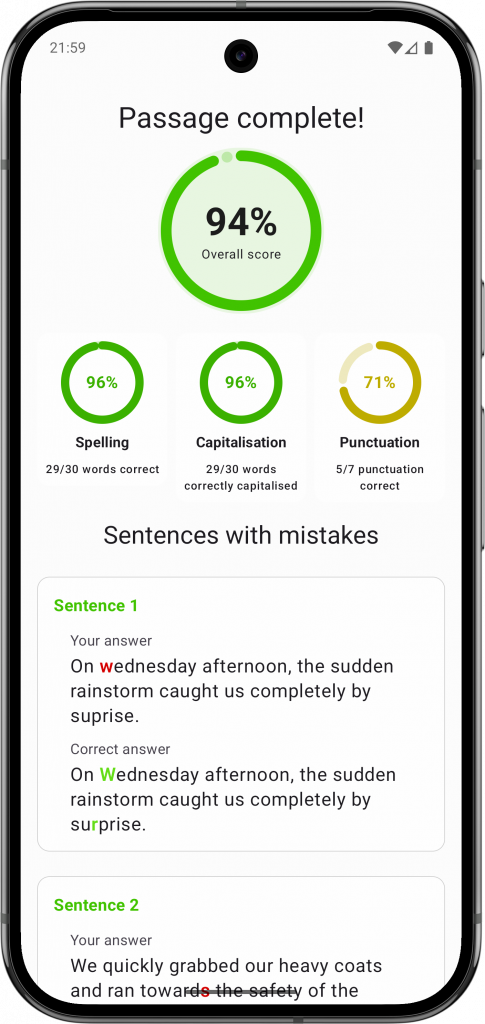
    After completing the dictation of the piece of text, the app shows a clear, side-by-side comparison of what your child wrote versus the correct version for each incorrectly written sentence. Instead of a page covered in red ink, mistakes are highlighted gently — making it easy for your child to see exactly where a comma was missed or a letter was swapped, without feeling discouraged.

    And when they get everything right? Playful confetti fills the screen to celebrate their success, making every milestone feel like a genuine win.

    Screenshot of Spelling Boost's Results and Correction Insights showing a side-by-side spelling comparison

    Step 4: Active Correction That Sticks

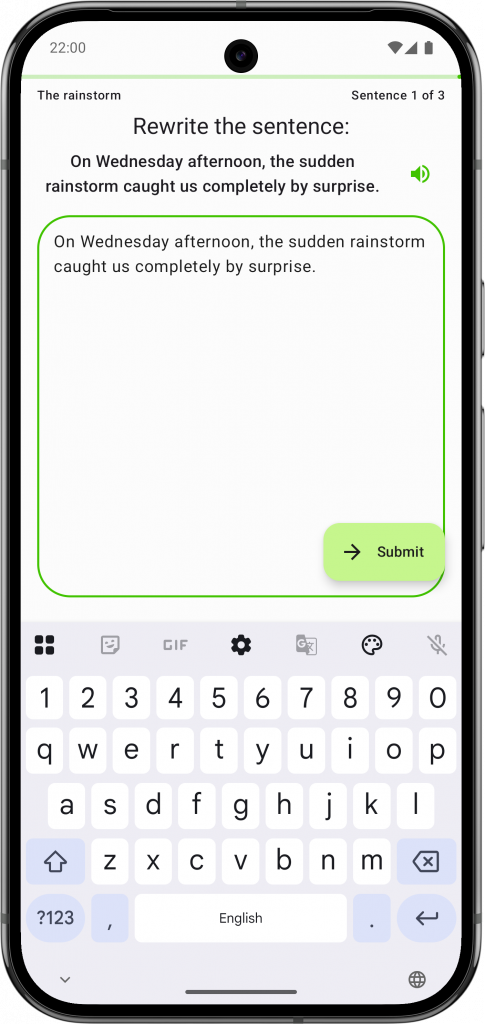
    Screenshot of Spelling Boost's active correction step where the child rewrites the sentence correctly

    Seeing a mistake is only half the learning. To make the correction truly stick, Spelling Boost asks your child to rewrite the sentence correctly before moving on. This active rewriting step builds the physical muscle memory and mental patterns needed to get it right next time — turning a simple correction into a lasting lesson.

    Tricky Words Don’t Slip Through the Cracks

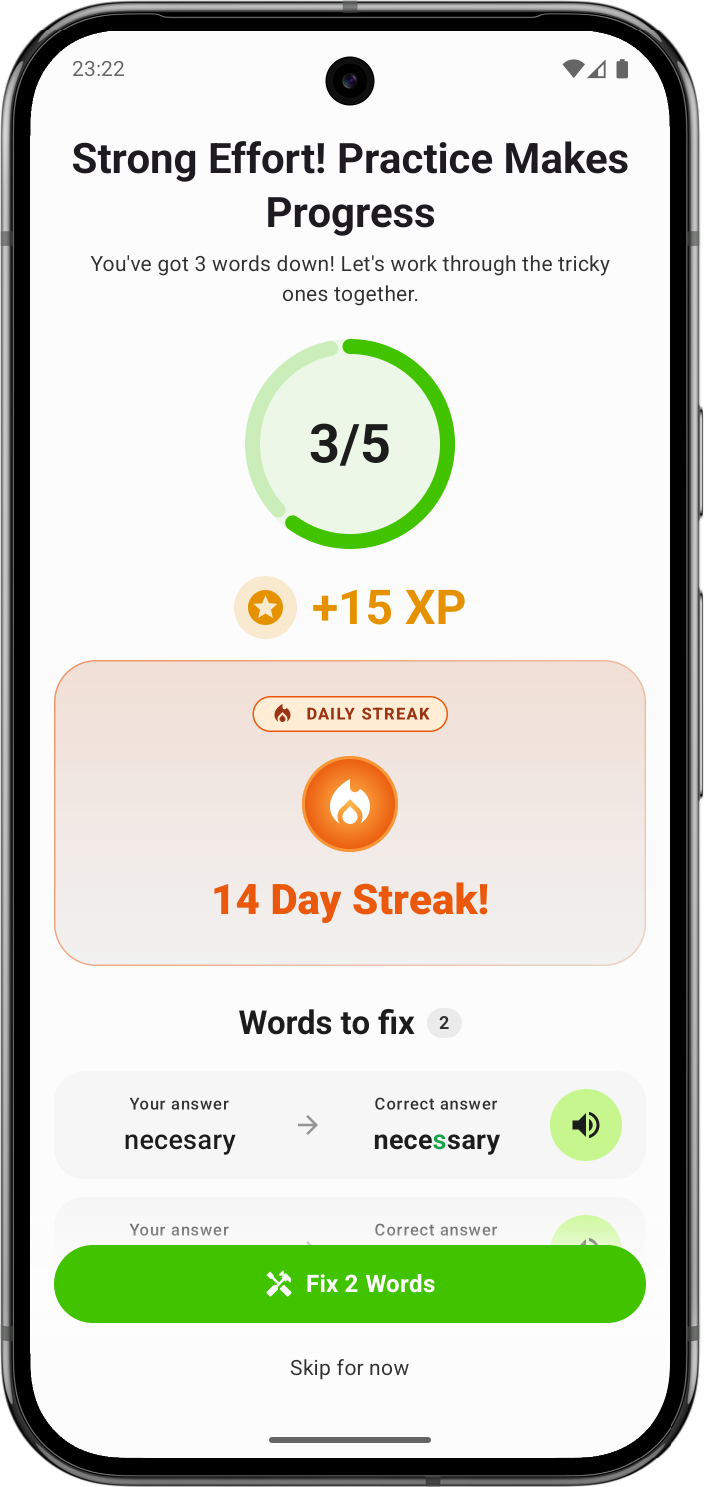
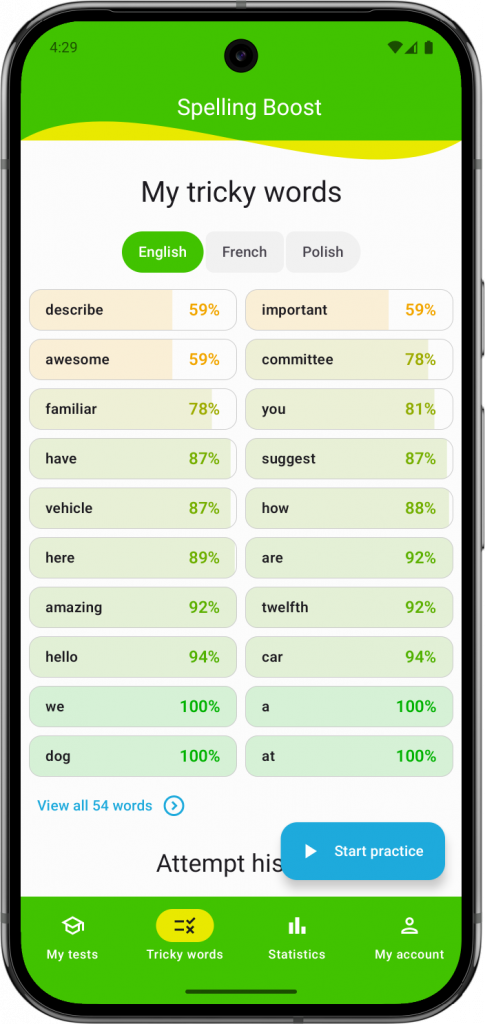
    What happens when your child keeps misspelling a particular word? Spelling Boost tracks every attempt automatically. Words that are frequently misspelled are flagged as Tricky Words and added to a focused review queue. The app brings these words back at just the right time, using spaced repetition to build deep, long-term memory — so nothing slips through the cracks.


    From Word Lists to Confident Writers

    Word lists are a helpful starting point, but they’re only the beginning of the journey. To raise a child who spells confidently in their everyday writing — not just on Friday tests — they need practice that mirrors the real demands of composition.

    Here’s a simple routine you can start this week:

    1. Learn the words first — use your child’s weekly word list to build familiarity with new vocabulary. Our guide to spelling test practice has lots of strategies for this step.
    2. Practise in sentences — once the words feel comfortable in isolation, switch to Text Practice Mode. Scan a passage from the school homework sheet, or create your own sentences using the target words.
    3. Review the tricky ones — let Spelling Boost’s Tricky Words system automatically identify and schedule review sessions for the words your child finds hardest.

    This progression — from individual words, to sentences, to targeted review — builds the complete set of skills your child needs to write fluently and confidently. And because the app handles the dictation and marking, your child can practise independently while you get on with your evening. Learn more about how Spelling Boost fits into your family routine on our guide for parents.

    Ready to move beyond the Spelling Test Illusion and build real writing confidence? Download Spelling Boost free on the Google Play Store and try Text Practice Mode today.

    Further Reading

    • (Re)thinking the Phonics-Spelling Connection — Research on why spelling mastery from isolated phonics drills often fails to transfer into independent writing (ScholarWorks@GVSU).
    • The Impact of Promoting Transcription on Early Text Production — Study showing how building transcription fluency frees up working memory for higher-level composition (ResearchGate).
    • Written Language Disorders — Overview of how phonological, orthographic, and morphological systems interact during writing (American Speech-Language-Hearing Association).
    • What’s the Difference Between a Dictation and a Spelling Test? — Explains why sentence-level dictation assesses deeper literacy skills than isolated word tests (From Sounds to Spelling).
    • How to Practice for a Spelling Test: A Science-Backed Guide — Our own in-depth guide to evidence-based spelling strategies for weekly school tests.
    Download Spelling Boost on Google Play
    July 25, 2026
  • What’s New in Spelling Boost 1.1.1

    The response to our Version 1.1 launch has been absolutely incredible! Parents and teachers worldwide have been putting the new Text Practice Mode to the test—scanning school sheets, practicing full-sentence dictation, and reclaiming their busy weeknights.

    We’ve been listening closely to your fantastic usage feedback and feature requests. To keep that crucial homework momentum going completely uninterrupted, we have rolled out Version 1.1.1 to address a few minor bugs and performance bottlenecks based on how you are using the app.

    • Lightning-Fast Marking for Long Passages: We loved seeing how many of you pushed the app to its limits by creating exceptionally long dictation passages! To handle this, we optimized our error-diffing algorithm. Even with massive paragraphs, the side-by-side correction breakdown is now completely instant, keeping your child focused in the “learning zone.”
    • Smart Audio Diagnostics: Clear audio dictation is the core of independent practice. Some users experienced a silent screen simply because their Android device didn’t have a text-to-speech engine active. Version 1.1.1 now automatically detects this and gently prompts you to install or activate the official Speech Recognition & Synthesis by Google LLC engine to fix the problem.
    • Other Improvements: We have made other behind the scenes optimisations, bug fixes and improvements to make your experience with Spelling Boost

    Thank you for helping us refine Spelling Boost with your real-world feedback!

    Keep your spelling routine stress-free—Update to Version 1.1.1 on the Google Play Store today!

    July 20, 2026
  • Master Full-Sentence Dictation and Reclaim Your Evenings with Spelling Boost Version 1.1

    It’s Tuesday evening. Your child brings home a full paragraph of text they need to practice for their weekly school dictation test. You are trying to prep dinner, but they need you to read the passage aloud: sentence by sentence, pausing, repeating, and checking their work. Between the spelling, the capital letters, and the punctuation, a simple homework task quickly turns into a stressful evening for both of you.

    We know how challenging it can be to balance a busy family schedule with supporting your child’s primary school literacy. Building on the foundation of our Tricky Words Mode, Spelling Boost Version 1.1 expands the application into a comprehensive spelling dictation and automated marking tool. By helping your child transition from memorising single words to mastering full-sentence writing, we aim to make home spelling practice independent, interactive, and stress-free.


    Effortless Homework: Scan and Dictate Instantly

    Primary school assignments often move beyond simple spelling lists to full-paragraph dictation. To help your child practice in context, we have introduced a new test format: Text Practice Mode.

    Instead of spending your evening dictating long passages, you can now simply scan your child’s printed homework sheet using our updated scanning tool. The camera scanner now supports creating new Text Dictation Passages alongside our existing Spelling Tests.

    The app digitises the text in seconds and converts it into an interactive dictation test. It doesn’t just track spelling; it checks capitalisation, punctuation, and spacing, turning a manual task into an automated, interactive lesson.

    Learning Without the Tears

    Seeing a page covered in red corrections can be discouraging for a young learner. To keep motivation high, our Results & Correction Insights provide a friendly, encouraging breakdown after every session.

    If a mistake occurs, the app displays a side-by-side comparison showing exactly what was written versus the correct version. This visual guide empowers children to self-correct, making it easy for them to spot a missed comma or a swapped letter. To make success more rewarding, we’ve added playful confetti animations for getting 100%, ensuring that every milestone feels like a win.

    Active Correction for Lasting Memory

    Understanding mistakes is only half of learning. To ensure these corrections are really remembered, Spelling Boost guides your child through an active rewriting step. They are prompted to type the full sentence out perfectly before moving on. This vital step helps build muscle memory and reinforces proper spelling, punctuation and capitalisation rules in context, turning a simple correction into a lasting lesson.

    Smarter Scheduling and Deep Literacy Insights

    Managing school schedules is a daily challenge. Version 1.1 includes several new productivity and utility features designed to keep your household running smoothly:

    • Exam-First Sorting: The “My Tests” screen now automatically prioritises upcoming school exams by the nearest date, ensuring your child always knows exactly what to practice next.
    • Smart Practice Reminders: Our intelligent notification system prompts your child to study at the optimal time before a test, reducing last-minute cramming.
    • Deeper Word Insights: Tapping on any word now opens a comprehensive hub. You can see exactly which spelling lists and text passages a specific word appears in, alongside its definition, example sentences, and practice history.

    Ready to Simplify Your Spelling Practice?

    By turning full-paragraph dictation into an independent, interactive activity, Spelling Boost 1.1 gives parents their time back and gives children the confidence to become fluent writers.

    Ready to turn those stressful evenings into calm, productive ones? Download or Update to Spelling Boost Version 1.1 on the Google Play Store today and let us handle both the dictation and marking.

    July 13, 2026
  • Version 1.0.8: From Amharic to Zulu, Spelling Boost Welcomes 15 New Languages

    What do classrooms in Ethiopia, the Basque Country of Spain, and Nepal have in common? In each one, children are on a unique journey to master their native language, learning the sounds, shapes, and spellings that connect them to their culture and community. We believe that the best learning tools should honor this journey, because when a child feels seen and understood, learning becomes less of a chore and more of an adventure.

    That’s why our latest update is dedicated to opening the doors of Spelling Boost wider than ever before. This isn’t just about adding features; it’s about extending a warm welcome to more families across the globe.

    Our Global Family Expands with 15 New Languages

    Our commitment to making spelling practice accessible for every child takes a giant leap forward today. We are incredibly proud to introduce dictation support for 15 new languages, bringing our total to over 70!

    This update continues our mission to ensure children can learn and build confidence in the language they know best. When a child can hear and practice words in their mother tongue, learning becomes more intuitive, effective, and fun.

    We are delighted to welcome speakers of:

    • Amharic
    • Basque
    • Burmese
    • Catalan
    • Galician
    • Kyrgyz
    • Lao
    • Malayalam
    • Mongolian
    • Nepali
    • Punjabi (Shahmukhi & Gurmukhi scripts)
    • Romansh
    • Sinhalese
    • Swahili
    • Zulu

    This expansion means our popular Tricky Words Practice Mode is now supercharged. A child in Nepal can now use this intelligent feature to master their most difficult Nepali words, and a student in South Africa can conquer tricky terms in Zulu, all within the same powerful system.

    Share the Gift of Spelling

    Every language we add is a step towards a world where every child has the tools they need to succeed. Do you have a friend, cousin, or colleague whose family speaks Amharic, Basque, or Zulu? Share this update with them—you could unlock a new world of spelling confidence for a child you know.

    Update your app today and help us spread the word!

    Update Spelling Boost on the Google Play Store

    November 17, 2025
  • Spelling Boost 1.0.7: Turn Tricky Words into Spelling Triumphs

    What’s the one word your child always struggles to spell? Every young learner has them—those tricky words that just won’t stick, no matter how many times they practice. The frustration is real, both for them and for you. What if your spelling app could learn alongside your child, identify those specific challenges, and create a practice plan to conquer them for good?

    With our latest update, Spelling Boost becomes more than just a practice tool—it becomes your child’s personal spelling coach.

    Introducing the All-New Tricky Words Practice Mode

    This isn’t just another spelling test. Our new Tricky Words Practice Mode is an intelligent system designed to help your child master the words they find most difficult.

    How does it work? Spelling Boost now pays attention to your child’s performance over time. It smartly identifies which words are misspelled most often and which ones haven’t been practiced in a while. It even considers how many times a word has been attempted, ensuring that true problem words get the attention they need. Then, it creates a focused practice session that targets these specific words, bringing them back at just the right time to build lasting memory and confidence. It’s a personalised, adaptive way to turn spelling struggles into spelling strengths. For families learning in multiple languages, you can easily filter your tricky words by language, ensuring practice is always relevant.

    You can find this new feature in the brand-new Tricky Words section in the bottom navigation bar. From there, you can see a prioritised list of tricky words, review past practice sessions, and launch a new session with a single tap.

    Get Deeper Insights with New Word Details

    To support this smarter way of learning, we’ve created a new central library for all your vocabulary. In the new “All Words” screen, you can view and search every single word you’ve saved. Tapping on any word in this library opens its powerful new Word Details screen, where you’ll find:

    • A full practice history: See every attempt for that specific word. This is the perfect way to see exactly when a tricky word started to click for your child.
    • Definitions and example sentences: Go beyond memorisation and help your child understand what a word means and how it’s used.
    • List membership: Quickly see all the spelling lists a word belongs to.
    • Easy word management: You can now delete a word directly from this screen. No more hunting through different lists—delete a word from its Details screen, and Spelling Boost automatically removes it from every spelling list it belongs to.

    A Smoother and Tidier Experience

    We’ve also made some important improvements to make your experience even better:

    • Improved Performance: We’ve optimized loading times across the app, so you can jump right into learning without delay.
    • Bug Fixes: We’ve resolved several crashes, particularly those that could occur when managing your word lists, and fixed an issue with language detection when creating new tests, making the app more stable and reliable.

    Our Global Classroom Continues to Grow

    While this update focuses on intelligent learning, our mission to make Spelling Boost accessible to everyone continues. As part of that ongoing mission, we’re happy to welcome speakers of Macedonian, Georgian, Armenian, Azerbaijani, Maltese, Telugu, Gujarati, Filipino, Kannada, and Tajik with full app UI translations. We’ve also added new regional support for French (Belgium) and Arabic (Libya).

    Ready to turn your child’s tricky words into spelling triumphs? Update your Spelling Boost app today and discover their new personal spelling coach!

    October 4, 2025
  • Spelling Boost 1.0.6: Your Child’s Global Spelling Adventure Just Got Brighter!

    Get ready to explore even more words and enjoy a more vibrant learning experience with Spelling Boost Version 1.0.6! We’ve been busy adding exciting new ways for your child to learn, practice, and master those tricky words.

    Get Ready for Dazzling Animations!

    Learning should be exciting, and now Spelling Boost is even more lively! We’ve added super cool animations throughout the app to make your child’s learning journey even more engaging:

    • Watch as question numbers playfully update, visually showing progress and making each step of a test more engaging.
    • See words gracefully appear and disappear from lists, providing satisfying visual feedback as your child organizes their learning.
    • Enjoy fun animations when finishing a test or reviewing corrections, making every step feel like a mini-celebration!

    Plus, never miss a word during a test! We’ve added a clear on-screen alert if your device volume is muted.

    Your Spelling Boost, Your Language!

    But our commitment to a better learning experience doesn’t stop at animations; we’re also enhancing the core ways your child interacts with the app. We believe every child deserves to learn in a way that feels just right. Building on the success of our previous language expansions that have connected learners worldwide, we’re thrilled to welcome even more communities to the Spelling Boost family.

    Now, the entire app experience – from setting up lists to checking progress – can be enjoyed in many more languages, including Arabic (Algeria), Chinese (Simplified), Uzbek (Latin & Cyrillic), Bosnian (Latin & Cyrillic), Persian, Slovenian, Kazakh, Urdu, Malay, Tamil, Vietnamese, and Marathi! This means more children than ever can learn and grow their spelling skills in their native language, making practice even easier and more fun. For languages like Uzbek and Bosnian, offering both Latin and Cyrillic scripts caters to diverse learning preferences and regional standards.

    Smoother Sailing All Around!

    We’ve also been hard at work behind the scenes, fine-tuning the app’s performance, especially around Google Play billing, ensuring a seamless experience even when managing subscriptions. We’ve made managing your subscription even easier and clearer, and fixed the layout of the meaning and example buttons on the Spelling Test Screen. This means a more reliable and enjoyable experience for everyone, so you can focus on what matters most: becoming a spelling superstar!

    Ready to dive into new languages and enjoy a more vibrant learning experience? Update your Spelling Boost app to version 1.0.6 now via the Google Play Store! What new language are you most excited for your child to try, and which new animation are you most excited to see? Let us know after you update!

    Happy Spelling, everyone!

    September 8, 2025
  • Spelling Boost 1.0.5: A Truly Global Classroom for Young Spellers!

    At Spelling Boost, we’re dedicated to making the journey of learning to spell an exciting and accessible adventure for every child. We’re thrilled to announce our latest update, Version 1.0.5, packed with significant enhancements designed to make Spelling Boost even more global and user-friendly!

    A Truly Global Classroom: More Languages Join the Boost!

    Our mission to connect young spellers worldwide continues with renewed momentum! Building on our commitment to making spelling accessible everywhere, Version 1.0.5 takes our efforts to new heights by significantly broadening our full app localization. We’re welcoming a vibrant array of new languages and regional variants, allowing children and parents to experience the entire Spelling Boost interface—from menus to instructions—in their native tongue. This makes learning more intuitive and effective than ever before.

    This update includes new display language support for:

    • Hungarian
    • Hebrew
    • Swedish
    • Croatian
    • Albanian
    • Norwegian (Bokmål & Nynorsk)
    • Slovak
    • Bengali
    • Belarusian
    • Lithuanian
    • Latvian
    • Estonian
    • Luxembourgish

    New regional variant support for:

    • English (Malaysia, Botswana)
    • French (Switzerland)
    • Spanish (Chile)
    • German (Austria)
    • Arabic (Syria, Oman, Saudi Arabia, Lebanon, Morocco)
    • Chinese (Traditional Taiwan)

    We believe every child deserves the chance to learn in a way that feels natural and empowering. Offering a fully localized experience fosters a deeper connection to their learning and builds confidence as they master spelling.

    Update Today!

    This update is all about making Spelling Boost a more inclusive and welcoming tool for your child’s educational journey. These enhancements are part of our ongoing dedication to making Spelling Boost the most effective and user-friendly app for young spellers.

    Ready to experience the latest improvements? Head over to the Google Play Store to update Spelling Boost to Version 1.0.5 today! We’re eager to hear your thoughts on these new languages—let us know what you think in the app store reviews or on our social channels!

    As always, thank you for being a part of our growing global community. Happy Learning!

    August 31, 2025
  • Spelling Boost 1.0.4 is Here: Never Miss a Test with Smart Reminders, Plus More Languages!

    At Spelling Boost, our mission has always been to make spelling practice easier, more effective, and even a little bit fun for children and parents everywhere. We’re constantly listening to your feedback and working to build the features that make a real difference in your learning journey.

    Today, we are thrilled to announce the release of Spelling Boost version 1.0.4! This is one of our biggest updates yet, packed with a brand-new feature to ensure you never miss studying for an upcoming test, a massive expansion of our language support, and powerful under-the-hood improvements for a smoother experience.

    Let’s dive into what’s new!

    Never Forget a Test with Smart Practice Reminders

    We know life gets busy. Between school, homework, and after-school activities, it can be a challenge to keep track of the next spelling test. That’s why we’re introducing our most-requested feature: Smart Reminders for Upcoming Tests!

    Never forget to study for a test again! Spelling Boost can now send you a smart reminder about your next upcoming spelling test. This isn’t just a simple alarm. The system is intelligent—it learns from your practice habits to send a notification at the perfect time, ensuring your child is well-prepared and confident on test day. It’s the perfect tool to help build a consistent study routine and eliminate last-minute cramming.

    To get started, simply update your app and grant notification permissions when prompted. Let Spelling Boost help you stay on track for test success!

    A Truly Global Classroom: Massive Language Expansion

    Spelling Boost is connecting more classrooms and homes around the world than ever before! Version 1.0.4 introduces one of our largest-ever language expansions, adding dozens of new languages and regional variants. We’re excited to welcome speakers of:

    • Finnish
    • Danish
    • Korean
    • Japanese
    • Arabic
    • Czech
    • Afrikaans
    • Khmer
    • Icelandic
    • Chinese
    • And many more regional variants for French (Gabon), Spanish (Peru, Costa Rica), Russian (Kazakhstan) and Dutch (Belgium)

    This update reinforces our commitment to making high-quality spelling education accessible to as many children as possible, in the language they know best.

    A Smarter, Smoother Experience

    We’ve also been hard at work fixing bugs, improving performance and making Spelling Boost work great on the new Android 16!

    Update Today!

    This update is all about making Spelling Boost a more intelligent, reliable, and indispensable part of your child’s learning toolkit. We’re incredibly proud of these new features and believe they will make a tangible difference in your spelling practice routine.

    Head over to the Google Play Store to download version 1.0.4 today!

    As always, thank you for being part of the Spelling Boost community. We can’t wait to hear what you think of the new update!

    Happy Spelling!

    July 21, 2025
  • Spelling Boost 1.0.3 is Here: Connecting a More Global Community!

    We are excited to roll out Spelling Boost version 1.0.3! This update is all about making our app more accessible and user-friendly for our growing international community and bringing everyone closer together.

    We’ve focused on two major areas: expanding our display languages so more people can navigate the app with ease, and introducing a new way for you to connect with the Spelling Boost community online.

    Navigate Spelling Boost in Your Native Language!

    We believe learning tools should be easy for everyone to use, no matter what language they speak. That’s why we’re thrilled to announce that the Spelling Boost app interface is now available in a host of new languages!

    This update translates all of our menus, buttons, and instructions, making it easier for parents, teachers, and children around the world to set up spelling lists and track progress in a language they are most comfortable with.

    The app interface now supports:

    • Hindi
    • Thai
    • Ukrainian
    • Romanian
    • Dutch
    • Serbian (both Cyrillic and Latin scripts)
    • Greek

    We’ve also added regional display options for French (Canada, Senegal), Spanish (Peru, Costa Rica), and English (Jamaica) to ensure the app feels right at home for even more users.

    Join the Spelling Boost Community!

    Learning is always more fun when you can share the journey! We’re excited to introduce a new feature that makes it easy to connect with the Spelling Boost community online.

    You will now occasionally see a new screen after a spelling test inviting you to join us on our social media channels. Follow us on Facebook, Instagram, YouTube, TikTok, and LinkedIn to get spelling tips, share your child’s success stories, and be the first to know about new features and updates.

    A Smarter, Smoother, and More Stable App

    Beyond the new features, we’ve made several important improvements behind the scenes:

    • Polished Design: We’ve refined parts of the app’s interface, like adding a new look to the word definition screen and improving the sign in experience, for a more intuitive and visually appealing experience.
    • Enhanced Stability: We’ve updated many of our core components and improved our error-handling to make the app more stable and to help us find and fix bugs even faster.

    We are incredibly proud of this update and believe it will make Spelling Boost an even more powerful tool for young learners everywhere.

    Ready to explore the new languages and features? Head over to the Google Play Store to update to version 1.0.3 today!

    July 1, 2025
  • Spelling Boost Gets a Global Upgrade! Version 1.0.2 is Here!

    We are thrilled to announce the release of Spelling Boost version 1.0.2, an update packed with exciting new features that make our spelling app more accessible and user-friendly for families around the world. Our mission has always been to make spelling practice easier and more engaging for children, and this update is a huge step towards bringing that mission to a global audience.

    ¡Hola! Olá! Merhaba! Now in More Languages!

    The highlight of this update is our massively expanded language support. We believe that learning should feel natural and intuitive, and that starts with using an app in your native language. We’ve worked hard to add a fully localized experience for users in 11 new languages and regions!

    This update brings full UI language support for:

    • Bulgarian
    • Indonesian
    • Italian
    • Portuguese (Portugal)
    • Turkish
    • Regional English variants for South Africa, Singapore, and Trinidad and Tobago
    • Regional Spanish variants for Colombia, Mexico, and the United States

    This means the entire Spelling Boost experience, from creating custom spelling lists to taking interactive tests, is now fully translated, providing a seamless learning environment for even more young spellers.

    Under the Hood Improvements

    Beyond the exciting language additions, version 1.0.2 also includes important updates “under the hood.” We’ve updated several key technical components to ensure the app is faster, more secure, and more reliable than ever. These continuous improvements are part of our commitment to providing a seamless and bug-free learning environment for your child.

    We are incredibly excited about what these changes mean for the future of Spelling Boost. Our goal is to empower as many children as possible to become confident spellers, and this update is a huge leap forward.

    Ready to check it out? Update Spelling Boost to version 1.0.2 today from the Google Play Store!

    June 4, 2025
1 2
Next Page→

Spelling Boost

Get it on Google Play
  • Facebook
  • Instagram
  • YouTube
  • TikTok
  • LinkedIn

Explore Practice & Dictation Guides